Engineering prototype of Nokia Normandy leaks in a live photo
http://www.gsmarena.com/engineering_prototype_of_nokia_normandy_leaks_in_a_live_photo_-news-7542.php
https://twitter.com/seamissu/status/422381295398686721/photo/1/large?utm_source=fb&utm_medium=fb&utm_campaign=evleaks&utm_content=422405967079161856
Tampilkan postingan dengan label Nokia. Tampilkan semua postingan
Tampilkan postingan dengan label Nokia. Tampilkan semua postingan
Minggu, 12 Januari 2014
Sabtu, 11 Januari 2014
Nokia Lumia Black software update features overview
Nokia Lumia Black software update features overview
http://blog.gsmarena.com/nokia-lumia-black-software-update-features-overview/
http://blog.gsmarena.com/nokia-lumia-black-software-update-features-overview/
Nokia Lumia 1520 – Hardware – Processor
Nokia Lumia 1520 – Hardware – Processor
http://blog.clove.co.uk/2014/01/11/nokia-lumia-1520-hardware-processor/
http://blog.clove.co.uk/2014/01/11/nokia-lumia-1520-hardware-processor/
Jumat, 10 Januari 2014
PETER CHOMANIČ: MY 5 FAVOURITE NOKIAS OF ALL TIME
Can you have too much of a good thing? Not if you’re Peter Chomanič, the man with 670 Nokias.
In the last few months, we’ve showcased the favourite five Nokias of some of the world’s biggest collectors of Nokia devices. To add another voice to the ongoing debate about which of Nokia’s smartphone are the greatest, we’re joined by Peter Chomanič. Peter’s had a very passionate relationship with mobile technology for over a decade. In fact, he’s so passionate he working to create the world’s first mobile phone museum. So, what does this curator of top tech consider Nokia’s fab five? To find out, read his thoughts below. Over to you, Peter.
 I’m a big mobile phones fan and well known in Slovakia and The Czech Republic as a Nokia fan. I’ve been collecting phones for about 12 years and now have almost 2200, 670 of those are Nokia devices made up of 200 different models. One day I’d like to create a mobile phone museum.
I love the designs that Nokia created and amazing technology that it packed into them. Looking into the past, it’s hard to choose only five. Even more so when you consider all the communicators from theNokia 9000 to the Nokia E90. Then you have the famous monochromatic display phones such as the Nokia 3310 or 6310i and even the amazing E & Nseries phones, such as the E50 or N80.
As for the more recent Nokia devices, I’d choose the Nokia Lumia 925. I used it for weeks and liked it the most. It’s made from a good choice of materials, with the right weight and a nice camera performance. What’s more, with the latest Windows Phone updates and apps it can even show time on a low power screen. This is something thing I loved much on E7 and N9 too. And if I might choose from non-smartphone devices that are still in shops and not only my museum :) it’d definitely be the Nokia 515. Again, because of its design and materials. .
Nokia 7650 – Launched 2002
Why did you get it?
Bought as my first smartphone, packing every technology I could imagine that time. As one person said: “7650 existed when other brands were still in stone age!”. I can only agree with that.
What did you love about it?
I used it as my only camera, voice recording device, TV control with IrDA (now pretty modern again!), using dozens of apps and still a phone with nice design and slider construction. I love sliders since then and I still own that phone, in working condition. Anyone remembers where the SIM card slot was? There was a smile face under the cover :)

Nokia 6103 – Launched 2006
Why did you get it?
One of few clam shell phones I ever used. It looked good with black matte finish, had really fine keyboard for fast typing.
What did you love about it?
I enjoyed it in times when I had no money for the latest flagships, but still needed something to chat online, so appreciated that amazing keyboard and adptive T9 function. Oh, and replaced 3 slim batteries each day which I had always in my pocket. Nice memories. Now I have that phone in black and even in red in collection, working, of course.

The Nokia N95 – Launched 2007
Why did you get it?
It was the smartphone that every Nokia fan dreamed of. And it was a slider, so no surprise I loved it :)
What did you love about it?
The 5 megapixel camera was still the only image taking device I had, but this time, it really did some amazing work. Wi-Fi enabled me to use less of my data plan. GPS helped me not to get lost in cities I visited for the first time, while used Sygic, well-known Slovak navigation software. Still in control of air-conditioner, Hi-Fi or TV even in friend’s home, as it was infra enabled too and I had some real fun with that. Matte finish of back side had warious color, I used plum and red one, but I have few more of them now in my museum.

The Nokia E7 – Launched 2011
Why did you get it?
I remember I was on Nokia’s press event in Prague and that phone amazed me. I had N8 that time, but I loved keyboard even more than the camera, it was joy to write on, so I had to have it.
What did you love about it?
The ClearBlack Amoled display, aluminium body and USB On-The-Go support with HDMI out. I used it almost instead of computer in many cases with wireless mouse. Latest generation of my beloved Symbian had many apps accessible on Ovi store and some really fine modding options on forums I moderated. You can imagine how fast, functional and reliable that phone became in few months with some updates and modding. I miss QWERTY keyboards now, as almost no phones have it now.

The Nokia N9 – Launched 2011
Why did you get it?
As I had pretty close to some Nokia developers in the past, I know that N950 could have been the N9 until some changes have been done. Even if I was sad that final N9 lacks QWERTY keyboard, I loved the design and polycarbonate material.
What did you love about it?
The MeeGo UI looked so good on that curved AMOLED ClearBlack display. I love to use it even now with no USB OTG or HDMI function. The system was fresh, fast, innovative, nice looking, with all I wanted from modern OS, even with possibility to satisfy the modder/developer part of me. So I did alphanumeric keyboard, did some changes to system in command line and became more friendly with Linux. Of course I did many things wrong and had to restore my data :) so don’t try this at home, or with it’s developer twin – N950 which I also have, but I’m too afraid to use it as daily phone.

I think we can all agree this is a fantastic selection of some of Nokia’s most iconic devices. These five not only show the amazing evolution of smartphone design, but how much smartphones’ capabilities have changed in such a short time. Of course, the million dollar question is whether you agree with Peter’s choices. If not, be sure to share yours in the comments below.
OUR FAVOURITE 5 NEW WINDOWS PHONE APPS OF THE WEEK
It’s only the second week of 2014, but we’ve already overwhelmed with tons of fantastic new apps.
So, if like us you’re back at work and feel like you be loosing that holiday vibe, don’t worry: we’ve got a handful of new and updated apps here that’ll blow those blues away. Roll up, roll up, and prepare to download.
Romans From Mars
What is it? A shooting game
Why we love it? You’re a Roman soldier defending your citadel from Jupiter and his Martin hordes; from on top of your battlement, you have to shoot down the invaders before too many of them hit the wall. There’s a variety of enemies that require different strategies if you’re going to take them out, and you get a few different nifty attacks (elemental strikes, lightening, etc.) It’s straightforward but gets pretty difficult and the short intense levels make for really addictive gameplay.
Who it’s perfect for: Gamers of all ages

Monk
What is it? A musical education app
Why we love it? We’ve seen nothing like this before: it’s a learning tool that teaches you all about scales and chords, how they work in relation to one another and other musical ins-and-outs that we can’t even begin to explain. It’s beautifully designed and really captivating; we’re hoping it’ll turn us all into Rachmaninoffs before the week is out.
Who it’s perfect for: musicians and music students and fans

ESPN F1
What is it? A Formula One info app
Why we love it? All F1, all of the time! If you’re a facing fiend, you’ll need this in your life. Available in English, Spanish and Portuguese, it’s got the lowdown on fixtures, news and info on drivers and circuits, live race commentary and driver positions, and added bling like a countdown clock on the homepage to the start of the next race. If you’ve tried any other ESPN apps, you’ll know how comprehensive they are. Again, this isn’t a brand-new app (it’s been around since the end of December) but we didn’t have enough space for it at the time and we don’t want you guys to miss out. Enjoy!
Who it’s perfect for: race fans

500px
What is it? A photo-sharing app
Why we love it? We’ve been waiting for this one – the official app for the immensely popular 500px website, a place where professional and amateur upload and share their best work, where the standard is consistently through the roof. We love this long-awaited WP app: browse pics and profiles, leave comments and generally go goggle-eyed with envy at all the skills on display – before uploading your own masterpieces.
Who it’s perfect for: photographers

Total Conquest
What is it? A world-building game
Why we love it? Continuing the Roman theme, this is a slightly older release (it came out back on Christmas Eve) but we’ve been pretty hooked on it: you’re a Roman governor trying to get your own city-state up and running, but in the wake of Caesar’s death you’ll have to create or join a powerful Legion if you want to really rule the roost. Play online and hook up with others to get the most out of it. Oh, and we love the colourful, detailed graphics, too.
Who it’s perfect for: Strategists and conquerors

We hope you enjoy these as much as we have and if you’ve unearthed any other gems be sure to let us know in the comments below.
NEW YEAR: NEW LUMIA GAMES
2014 already looks like an exciting year for Nokia Lumia fans, and there are a load of new Lumia games that promise to keep you entertained on the go. We’ve been putting six of them through their paces, and they’re all worthy downloads for your Nokia.
Temple Run 2
 The original Temple Run was one of the most popular Windows Phone games ever. Its successor offers a lot of the same attributes; fast paced, easy to get to grips with and, above all, incredibly addictive.
The controls and idea behind the game remain the same – escaping temple monsters by swiping and tilting your Lumia around temple paths. But now, the routes have changed completely, with demanding gradients introduced, zip wires to descend and obstacles to overcome. The result is every bit as good as we hoped, and it’s a game you’ll still be playing well into 2014
Asphalt 8: Airborne

The Asphalt series has long set the pace for mobile racing games. Asphalt 8: Airborne, the latest, continues the trend, showcasing incredible graphics and fast, addictive gameplay.
Drive, drift and jump your way around stunning new environments in the latest supercars, including the Ferrari FXX and Lamborghini Veneno. For petrol-heads, Asphalt 8 is as close to mobile automotive nirvana as you’ll get.
Rabbids Big Bang

Out of all the games here, Rabbids Big Bang is the one we literally couldn’t put down. A short test of the game quickly ate into dinner time. And beyond. We’re still playing it as you read this.
Although similar to Angry Birds – judge your trajectory, tap-to-fire your beast – here you’re presented with different controls and a fresh look. Aim where you want Rabbid to whack his mate with a baseball bat and his sidekick will be fired off into space. It’s so pleasing. Use gravity to get around and employ a range of tricks to accomplish missions and progress. Put simply, we absolutely love it!
Hill Climb Racing

Hill Climb Racing is another game that we adore for its simplicity. All that’s required is to accelerate or brake, picking up coins that can be spent on upgrading your wagon.
However, when the going gets bumpy the game suddenly gets a lot more difficult. Hit the terrain hard in the wrong way and you’ll end up squashing your driver. Fail to pick up fuel cans and you’ll run out of gas. The further you get, the harder it becomes, making Hill Climb Racing all the more addictive.
Zombie Derby

Zombie Derby follows in the footsteps of Hill Climb Racing, but this time you’re driving for your life, escaping the murderous clutches of the undead.
You can add plenty of upgrades to your car – guns, bigger engines, nitro – but its the fuel tank you’ll need to pay particular attention to; run out of juice in the middle of the desert and you’ll be zombie food. Good luck!
Rail Rush

If you love Temple Run, you’ll appreciate Rail Rush – a super-fast and great-looking game that also offers frantic and addictive gameplay. This time you’re on an abandoned goldmine railroad, jumping between disused track, ducking, swerving and jumping over different obstacles.
New levels and new environments help to keep the game fresh and exciting, and it’s always a pleasure to play.
Do you have a favourite new game for your Lumia? Let us know in the comments below
MY LUMIA 1520 START SCREEN
The Nokia Lumia 1520 (and the Lumia 1320) is really a different sort of beast to any of the other Lumia smartphones.
As I explained when I gave my first impressions of the phone, the increase in size changes the way you use it. You won’t buy a Lumia 1520 just for texting your mates or phoning your mum (though it can, of course, do both those things). But a much smaller, simpler device would suffice if those were your priorities.
No. The Lumia 1520 was born to make content shine in rich apps.
So that helps to explain the differences between the Start screen on my Lumia 1520 and the Start screen on the Lumia 920 I wrote about a year ago.

Start Screens: Old vs New
Where phone-based communications took centre stage on the Lumia 920, on the Lumia 1520, there’s a much wider and richer set of apps.
With room for 15 medium-sized tiles on the opening screen, there’s no need to restrict yourself in any way. You can fit everything you’re likely to do on a regular basis and a few more that are simply ‘nice-to-have’.
For those of you wondering why I have picked grey as my theme colour, which might seem like an unexciting choice – it’s because it looks really good against white phones – a tip I picked up from Nokia UX design chief Nicki Barton.
Just to pick out a few that really shine. My weather app of choice remains Weather Flow by Gergely Orosz (who we’veinterviewed before). I love the graphical style of Windows Phone, but having a few Live Tiles that use rich imagery really makes it shine because of the contrast.
The Kindle app means you don’t need a separate e-reader anymore on the 1520. The size of the screen and wide choice of presentation styles means you can comfortably read your books at arm’s length, without having to flick forward every five seconds. I can’t get enough news, and so Zite and Paper Boy are the apps I turn to most often when I have a minute to spare.
I’m also going to call out Quick Timer by Pavel Kaufman as a new must-have – you’ll notice I’ve given it a medium-sized tile, even though it doesn’t display any content. Maybe it’s symptomatic of modern life, but I need alarms every time I use the oven, and this app has literally saved my bacon on a few occasions!
The fact that you pretty much have to use two hands to operate the Lumia 1520 has also impacted the layout of my screen. Putting key apps at the top of the screen no longer makes so much sense, since it’s a longer stretch to hit them. Instead, the caller, email and SMS tiles sit in the middle of the right-hand side of the screen. At a pinch, I can even open them one-handed with my thumb there.
Are you using a Lumia 1520 or Lumia 1320? How have you arranged your screen?
ASHA APP SPOTLIGHT: IMAGE HIDER
Your Nokia Asha can store thousands of photographs using memory cards, but keeping embarrassing or silly images private and away from prying eyes can be a concern. That’s where Image Hider comes in.
The idea behind Image Hider is a simple one. Without a password, nobody can view the photographs you’ve encrypted. So, if you have party snaps you want to share with friends but keep hidden from other people, it’s the ideal solution.
The first time you use Image Hider, you’ll be asked to pick a password, confirm the password and enter your email address. You’ll also be asked to enter a reminder for your password, just in case you forget. Once that’s done, you’re good to go. Then, it’s a simple case of picking the images you want to hide.

Clicking the large Image Hider icon that fills the screen brings up a directory of your files: Memory card, Phone and Private. There’s no need to navigate through sub directories – choose between phone and memory card and all of your photographs will show up automatically.
To protect an image, tap and hold it. Once highlighted, then press ‘hide’. Once hidden, a small lock icon appears alongside the file name.

Encrypted photographs show up as plain black squares when viewing the image gallery on your Nokia Asha. The more you encrypt, the more plain squares show up.
To view a photograph again, log into Image Hider, tap to select it, and then press ‘Unhide’.
The end result means that casual acquaintances who may be playing around with your Asha won’t get to see that snap of you wearing a silly hat, decked out in fancy dress.

The whole process is wonderfully simple, and it’s a great way of keeping photographs close to your heart safe.
Nokia phones amazing quality & reliability tested
At Nokia we know your phones need to respond to the demands of your life. Every Nokia phone comes with our Nokia promise of quality and reliability. This video shows you why.
32GB Nokia Lumia 1520 AT&T goes on sale
32GB Nokia Lumia 1520 AT&T goes on sale
http://www.gsmarena.com/32gb_nokia_lumia_1520_at_t_goes_official-news-7532.php
http://www.gsmarena.com/32gb_nokia_lumia_1520_at_t_goes_official-news-7532.php
Update Nokia Lumia Black
Nokia has announced the beginning of the spread of updates Lumia Black for Nokia Lumia smartphones based on WP8. The update includes a host of new features, better photo technology, applications and recent innovations from Microsoft and Nokia, which will improve the capabilities of smartphones Lumia.
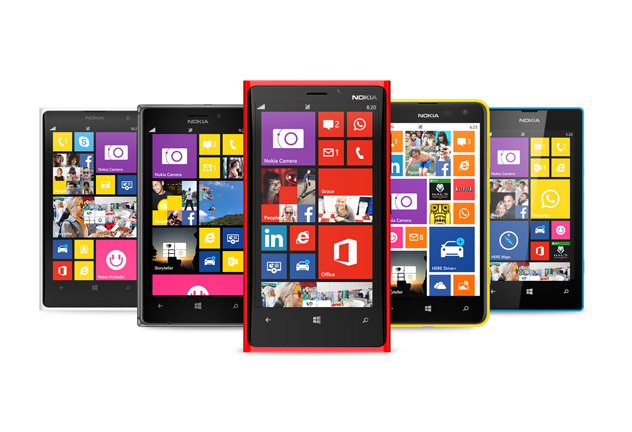
After installing Lumia Black smartphone users will receive the following features:
- App Folder (" Folders ") - a new proprietary feature that is designed to work with Lumia sdelaet more flexible, further extending the personalization options and organizing the start screen. With App Folder option can group multiple applications or individual settings on one tile (they will be united by a common background).
- Screen Nokia Glance 2.0 will help in real-time tracking of important information, not including smartphone. On the lock screen will be displayed various notifications: calls, messages, emails, Outlook, calendar or notice some games and applications, such as Twitter, Facebook, WhatsApp.
- Bluetooth LE . Wireless technology with low power consumption make all Lumia phones based on Windows Phone 8 compatible with gadgets like sports wear Adidas MiCoach.
- Nokia Refocus (" Change of focus "). This application will come to all Lumia smartphones based on Windows Phone 8 with 1 GB of RAM or higher.
- Nokia Beamer (" Projector "). Opportunity to share what is displayed on the screen, including being photographs, documents, presentations, etc. Any content will be displayed on another screen that supports HTML5 - enough to scan QR-code. This feature is available for all smartphones with 1 GB of RAM or higher.
- Nokia Storyteller (" Stories "). Application previously available for Nokia Lumia Lumia 1520 and 2520, will now be found on other models. The application will automatically organizes photos based on data on the time and place of the shooting. Tight integration with maps users will also get additional information.
- Nokia Camera (" Camera "). The application combines the capabilities of Nokia Pro Camera and Smart Camera. Last year, new features can benefit the owners of smartphones with the technology PureView, they are now available at all on the basis of Lumia WP8.
- With the upgrade to Nokia Camera also will support " digital negatives "( DNG ) for Lumia 1020, which had previously been implemented only in Lumia 1520. DNG format gives access to the "raw" raw visual data.
- A new generation of image processing algorithms . With updating Lumia Black, as the manufacturer promises, improve the quality of the photos, especially taken with the Lumia 1020. Among other things, improve touched oversampling algorithm: the image will look more natural, with less noise at the same time the sharpness will remain on top.
Also update Lumia Black Nokia Lumia smartphones come several enhancements from Microsoft. Among them safe driving mode in which disabled unnecessary driving functions, as well as setting ringtones for each contact. In addition, you can close the application through task manager and lock screen rotation.
First update will be distributed Lumia Black smartphone Lumia 925 Lumia 1020 and soon it will come to other models.
NOKIA LUMIA INSTAGRAMER OF THE WEEK: ANSHUL RAVISHANKA
To appreciate how insanely popular Instagram is, consider this: More than 5 million photos are uploaded there every day and these generate an incredible 8000 likes a second!
It’s hardly surprising then that when Instagram became available at the Windows Phone Store, tons of Nokia Lumia photographers rushed to join up. Now, with literally tens of thousands of Nokia Lumia lovers on the social network taking stunning photos it can be difficult to know who to follow. Happily, in the coming weeks we’ll be showcasing some the best of the bunch. First up is Anshul Ravishankar from the beautiful city of Mysore in Karnataka, India.
Before we get to see some of his amazing photos, we asked Anshul a few questions about his passion for photography, his Nokia Lumia and how he uses Instagram.
 So, Anshul, what Nokia Lumia do you have and what do you like about it most?
 I own a Nokia Lumia 920. When I first spotted it, it really was love at first sight. And what do I love best about it? That’s easy. I absolutely love the camera!
Where do you take most of your photos and what sort of photos do you like to take best?
I take them just about anywhere and everywhere. My home, my college and of course the streets of Mysore. I’m also really passionate about macro photography. I think that one my strengths lies in taking these types of photos. I love the macro world.
What are you top tips for taking Instagram photos on your Nokia Lumia?
Pause for a moment and look around you. We live in a truly beautiful world and there’s so many beautiful things to shoot in everyday life. Also, remember to keep it simple. For macro shots, focus is everything. Focus on the part of the subject, which you think is most interesting. For shooting sunsets, try using a lower ISO as, in my opinion, it gives a more pleasing effect. Never be shy to take a shot in public. Don’t ever miss out on a shot because you think people are watching you. Trust me, you’ll regret it later on. Finally, I think editing is just as important as shooting. Spend some time on post-production. I promise you it’s well worth it!
Which five Nokia Lumia instagrammers do recommend everyone to follow?
Which are your favourite photos you’ve shared on Instagram and why do you like them?

It took me an hour to get this little fellow to pose for me! I love those heterochromatic eyes.

I took this picture with the stock camera app. I waited for a long time and kept taking a lot of photos to get a good shot. I didn’t know any camera settings at the time. I just got lucky!

Is it a painting of a window or a window which looks into a painting called nature?

This reminds me of my grandfather who loved fishing. This picture was for him.

Pride! She sure made me run around a lot before giving me a good picture!

This was me using focus to try something different.

Everyone loves to dream. I took this shot and wanted to delete because I thought that it was not that good. But something inside wouldn’t let me. When I transferred this to my PC for editing I was really happy that I hadn’t.

This was a hand held selfie I used a convex lens to increase the magnification and I was awestruck with the results. This shot made me love the macro world even more!

This picture reminds me of autumn. It’s a beautiful time for photographers.

Caught this little guy surveying his land.
Ten awesome shots from an awesome Lumia Instagramer. If you want to see more of Anshul’s work, and of his world, be sure to follow him on Instagram. And if you’re a Nokia Lumia Instagramer and would like to see your work showcased here, you can either follow me on Instagram or share your best pics with #Lumia, or both. In the meantime, we’d love to hear which of Anshul’s fantastic photos you like best, and why, in the comments below.
KEEPING KIDS ENTERTAINED WITH THE NOKIA LUMIA 2520
While the Nokia Lumia 2520 is ideal for checking emails, updating Twitter or Facebook, and using Microsoft Office RT for creating documents for us adults, it’s also a great device for keeping the kids occupied on long car journeys.
As any parent will know, kids need constant stimulation and they also regularly demand to play with the gadgets that they see us use day in, day out.
Sometimes it’s easier to distract our kids, but sometimes it’s just impossible – such as when they’re strapped into the backseat of your car on a long ride. With the Nokia Lumia 2520, you can load it up with apps, such as the following, hand it over and keep your little one(s) entertained for as along as you need.
Dragons Adventure

Combing the real and virtual worlds using HERE platform, DreamWorks and Nokia created Dragons Adventure with children in mind.
Based on the How to Train Your Dragon movies, your child can immerse itself into a world of adventure that looks like it’s come straight from the dark ages.
As you begin your long drive, your child can begin a ‘Car Quest’. Add your destination into the game and as you drive along your route, that exact same route is displayed on Dragons Adventure – albeit a more medieval looking one.
Your car is transformed into an ox-drawn cart. When you turn left, so will the character in the game. When you hit traffic and slow down, the road within the game will become bumpy and even when it starts to rain in the real world, the clouds open up in the game, too.
The aim of the game is to collect treasure, sheep, fish and even cabbages with your sidekick – a dragon – who flies around the map at your child’s command.
If there are two of you in the front, the person in the passenger seat can download the Dragons Adventure companion app onto their Nokia Lumia smartphone to play along with the child to launch surprise dragon attacks and give special items to help them on their quest.
Fresh Paint

Painting is a great way to pass the time and this app means your kids can have all their colourful fun on the move.
With Fresh Paint, your child can be as creative as he or she wants, drawing to their heart’s content on a blank digital canvas.
Alternatively, they can colour in any of the supplied templates or buy more ‘activity packs’ if they exhaust all of those.
The painting techniques are uniquely realistic, as are the canvases that are rough and bumpy. Colours blend nicely with others, as if you were using real paint.
There’s lots to see out of the car windows on a drive, so plenty of inspiration for the kids.
Netflix

If gaming and painting failed to hit the attention spot, then maybe watching a movie or TV show might.
Take advantage of Netflix’s profiles and create one for your child(ren). Doing this will allow you to control precisely what types of movies they have access to, to ensure they’re watching age-appropriate material.
Netflix is a streaming service, which means this might only be an option if you’ve got a big data plan, or if you only plan on making a small trip. We’d advise you to keep tabs of your data plan whenever possible.
With Netflix’s vast collection of TV shows and movies, your child will doubtless find something to keep them entertained.
Games galore on the Windows Store
With a bevy of games to download, your Nokia Lumia 2520 can become a gaming machine for your little ones.

Cut the Rope, Angry Birds Space and Angry Birds Star Wars, Temple Run: Brave, Despicable Me: Minion Rush, andDisney Fairies Hidden Treasures are just a few to try.
Do you think any of these will keep your kids occupied for a while? Do let us know, or suggest any others, in the comments section below.
MAKE A CALENDAR FROM YOUR NOKIA ASHA SNAPS
There are plenty of things you can do if you want to get creative with your Nokia Asha 502, thanks to the wide choice of apps available on the Nokia Store. Why not take advantage of image-editing apps to create photos for your own personal 2014 calendar?
With the entire year ahead of us, turning your photographs into a calendar is a great way of showing them off to the world. And your workmates. See our guide below for some of the effects you can employ using apps like Photofunia and Photogram.
January

Photofunia: Why not have a bit of fun to kick off the year, creating your own “Wanted: Dead or Alive” poster. You can add existing photographs on your Nokia Asha, or you can also take a new snap using Photofunia. Once you’ve selected an image, just press ‘Go’!
February

Photofunia: Your calendar can contain all sorts of different images, and we love the billboard templates on offer from Photofunia. It makes it easy to turn people or pets into the centre of attention.
March

Photofunia: ‘Keep calm’ images were everywhere last year – and it only takes seconds to make your own using your Nokia Asha. Customise the text to anything you want, just keep it clean… and funny.
April

Camera Effects Pro: If you’ve got any photographs that already look a bit retro – old clothes, fancy dress party, an unusual car – you can travel back in time with Camera Effects Pro, producing images that look like they came from a different decade.
May

Photofunia: Being the object of desire at a photo gallery may sound like a nightmare to some people, but it’s easy to have a laugh and create your own personal gallery using this app.
June

Photogram: Photogram is a great choice for adding profile photographs to your calendar, with some great black and white, and sepia lenses. It’s also quick and easy to use.
July

Photofunia: If a regular gallery isn’t enough for you, you can also use Photofunia to mock up your photographs in the world-famous Louvre.
August

Photofunia: Want to be a film star? One of Photofunia’s templates lets you turn photographs into cuts of ‘film’, giving your subjects that star quality!
September

Photogram: Polarising your images is just one of a number of effects you can get from Photogram, creating some unusual and interesting results for your calendar.
October

Photofunia: Among loads of other choices, the filters on this app make it easy to change the weather conditions on your photographs, adding features like snow.
November

Camera Effects Pro: Not all your photographs have to be happy or fun; if you want something a little more heartfelt for your calendar, Camera Effects Pro makes it easy to add lenses to your images, creating retro photographs at the touch of a button.
December

Photofunia: You don’t need to stick to photographs with Photofunia either, a wide range of templates makes it easy to add text, too. Want to stick to something simple? You can even add the name of each month to a generic photograph.
Have you played with any of these apps on your Nokia Asha? Let us know in the comments below. Or even better, share your masterpieces with us!
Take a quick look at the Lumia Black software update
Get the Lumia Black software update for your Windows Phone 8 Lumia smartphone: http://www.nokia.com/global/windows-p.... This latest software update brings you an enhanced Glance Screen, a even better camera experience, and amazing apps like Nokia Storyteller and Nokia Beamer.
Nokia Lumia 1320 and Lumia 525 hands-on
Nokia Lumia 1320 and Lumia 525 hands-on
http://blog.gsmarena.com/nokia-lumia-1320-and-lumia-525-hands-on/
http://blog.gsmarena.com/nokia-lumia-1320-and-lumia-525-hands-on/
Kamis, 09 Januari 2014
NOKIA LUMIA BLACK UPDATE BEGINS ROLLOUT
From today, Nokia Lumia WP8 owners around the world will start to receive the new Lumia Black software update on their smartphones.
The Lumia Black update combines a host of new features, improvements in imaging, new apps and app updates from Microsoft and Nokia to make your Lumia smartphone experience even better. So what can you look forward to, once Lumia Black is installed?
App Folder. This brand new feature makes your Lumia experience even more fluid by giving you an option to further personalize and organize your Start screen. With App folders you can group similar apps and settings into one folder, a tile, on your Start screen.

Nokia Glance screen 2.0. Helps you keep track of information in real time, making all your most important notifications including: phone, messages, email, outlook, calendar, or any apps that use notifications such as Twitter, Facebook, Whatsapp, or games; always visible at a glance on your screen. It saves you time and energy.
Bluetooth LE. Will now be enabled across the full Windows Phone 8 Lumia range for compatible gadgets like the Adidas MiCoach accessories.
Nokia Refocus. The amazing Nokia Refocus comes to all Windows Phone 8 Lumia smartphones with 1GB of RAM and upwards. This app has to be seen to be believed, so what better excuse for showing another example:
Nokia Beamer. Sharing what’s on your phone is easier than ever with Nokia Beamer. No longer restricted to just photos, you can now beam documents, presentations, anything you like, to any HTML5-enabled screen by simply scanning a QR code on the screen. It’s coming to all of the phones with 1GB RAM upwards.

Nokia Storyteller. This app debuted on the new Nokia Lumia 1520 and Lumia 2520 late last year. Now the experience comes to other Lumia smartphones. The app arranges your photos for you, by date and by place, making it easier to tell the stories behind your pictures, and give extra context through the close integration of interactive maps.
Nokia Camera. Combines Nokia Pro Camera and Smart Camera to simplify the photo-taking experience, and ensure you get the perfect shot every time. The app has been available for Lumia PureView smartphones since last year, but it’s now coming to the rest of the WP8 Lumia range.

The latest Nokia Camera update also brings raw DNG support for Lumia 1020 owners – something that’s already available for Lumia 1520. The DNG format gives you access to pure and untouched visual information, allowing you to do more and be more creative with your images. If you are an enthusiast or professional photographer, now you can use your professional workflow with your smartphone images.
Latest generation of imaging algorithms. The Lumia Black update further improves the image quality, especially in Lumia 1020. Among others, the improvements include a new oversampling algorithm, making your images more natural looking with reduced noise, while ensuring your photos remain wonderfully sharp.
The Lumia Black update also brings a series of enhancements from Microsoft to Nokia Lumia smartphones. These include safe driving mode – which cuts out unnecessary distractions when you’re on the road; customised ringtones for each contact. You can now also close apps within the in multitasking view and lock the screen rotation if you wish.
“Nokia Lumia Black updates the imaging experiences on your Lumia and makes using the Windows Phone even more fluid. New App Folders and the ability to close apps in multitasker are my personal favourites. I also encourage everyone to try out the Nokia Refocus app that introduces a whole new dimension to photography,” says Samuli Hänninen, vice president of software program management for Nokia’s Smart Devices business.
How do I update?
The Lumia Black update has begun rolling out now for Lumia 1020 and Lumia 925 smartphones, with other models in the range following in the coming weeks. For more information go tohttp://www.nokia.com/global/support/software-update/wp8-software-update/.
Your Nokia Lumia smartphone automatically checks for updates every week, and will notify you when it finds one. Otherwise, you can go to Settings -> Phone update and check for yourself. If Lumia Black is ready for your phone, you’ll be able to download and install it straight from that screen.
We hope you enjoy your refreshed Lumia smartphone, once it’s updated. What’s the highlight for you?
Langganan:
Postingan (Atom)